
Ten years ago, ServiceNow announced Service Portal at Knowledge, and the conference actually told you how it worked. There were sessions on writing widgets, deep dives on the server script API, lab seats you could walk into. The API surface — sp_widget, sp_portal, $sp — wasn't massively complex, but you left a session, opened a tab, and wrote code that ran. I flew home from Vegas with the docs cached and spent the flight on my first widgets. By the time I landed I had a passable clone of the homepage I'd been staring at on the conference WiFi. That weekend I built three more. The framework rewarded curiosity.
This year I flew home from Knowledge and the contrast was loud. The buzzword was Employee Slate, the decks were beautiful, the demos were — in more than one case — static HTML files. Not early-build prototypes with a stubbed backend. Actual screenshotted UIs masquerading as working software. No sessions on how the framework underneath Slate worked. Nothing meaningful to cache. Same product-deck energy as Helsinki, none of the substance. The framework itself — which, spoiler, is called sn_aiux and is the actually interesting object here — is shipping right now on Zurich Patch 9, and it is, depending on how you count, the third time in a decade ServiceNow has reinvented its portal story. (If you don't count UI Builder, it's the second. ServiceNow's product marketing seems to be going with "second.") I figured I'd repeat the experiment: open the bundle on the plane, see how it works, write down what I found.
The short version: Employee Slate is one experience built on a new framework called sn_aiux. Not the framework itself. The framework is the interesting thing. It's a Lit.js + Tailwind + DaisyUI runtime with a deliberate bridge that embeds your existing Angular Service Portal widgets inside Lit components. There's a Service Portal record (sp_portal) sitting next to the framework as a sidecar — it carries the theme that reskins those embedded SP widgets so they don't look like 2016-era Bootstrap dropped into a Tailwind page — but sn_aiux is not running on Service Portal. Nothing you've already built has to be thrown away. New work happens in a stack that's much more familiar to anyone who's written modern web components in the last five years.
This post is the architectural map I wish ServiceNow had handed out.
Availability. sn_aiux ships on Zurich Patch 9. Three store apps must be installed:sn_aiux_ia_config,sn_aiux_builder,sn_aiux_components.


The naming, untangled
Walking out of Knowledge, I assumed "Slate" was ServiceNow's new word for "portal" — the framework name, the way Service Portal was. It isn't. And to be fair, "Service Portal" wasn't really the framework name either, even though everyone used it that way. The framework called Service Portal shipped with a default portal also called Service Portal, mounted at /sp. That collision haunted every customer conversation for years. "Service Portal the framework, or Service Portal the portal? The one at /sp, or your portal?" It took ServiceNow several releases to ship Employee Center — a real branded employee intranet built on top — and only then did the naming start to separate. The framework was Service Portal. The portal was Employee Center.
sn_aiux is the same shape, told more clearly. The framework is sn_aiux in the codebase (written AIEX in marketing material — when you see /sncapps/aix/..., sys_aix_* tables, or <aiux-angular-element>, that's sn_aiux internals). Slate is the headline experience built on top, analogous to Employee Center — a real, branded, default landing destination. The mapping to what you already know:
- Service Portal is to sn_aiux what framework is to framework.
- An sp_portal record (Employee Center, ESS, whatever) is to a sys_aix_experience record (Slate, your custom landing experience, the Builder itself) what a portal is to an experience.
- Pages, widgets, themes — all the supporting concepts have direct equivalents.
The fact that ServiceNow led with the experience name at Knowledge and barely mentioned the framework is, at this point, a pattern.
Where experiences live
I didn't start by digging through Service Portal — but somewhere in the first hour I noticed an sp_portal record titled "AIUX Portal" (sys_id 7cf6e70a3f123210860f2248001f8b63, url_suffix aiuxsp) and felt a small wave of dread. ServiceNow has form for stuffing new technology into old tables and calling it modernization. If sn_aiux experiences were going to be sp_portal rows with extra columns and a Lit veneer, this was going to be a very different post.
Mercifully, they didn't. That sp_portal record isn't where sn_aiux experiences live, and it isn't a runtime host either. It's a sidecar. Its job is to carry the theme that re-skins embedded SP widgets when they get bridged into sn_aiux pages — so an Angular catalog widget renders against Tailwind/DaisyUI tokens instead of Bootstrap defaults — and to provide the portal-scoped $sp context for server scripts that ask for it. Hit /aiuxsp directly and you get a standard service portal homepage almost the same as where Helsinki left it. The actual experience records live in sys_aix_experience, addressable through a different config endpoint:
GET /api/now/aix/config/<url_suffix>
Accept: multipart/mixed
With aiuxsp as the suffix, that endpoint returns 400 "Experience not found" — confirming the sp_portal record isn't an experience. With builder as the suffix, it returns 200 and a full JSON payload describing the SN AIUX Builder experience: its sys_id, theme, telemetry config, landing path, and (interestingly) a list of URL rewrite rules. We'll come back to those.
The URL pattern for any sn_aiux experience comes straight from the bundle:
DEFAULT_PATTERN = new URLPattern({
  pathname: `/${vHostSiteName}/:experience/:page*`
});
vHostSiteName is the constant "aiux". Which means every experience URL is:
/aiux/<experience_url_suffix>/<page_path>
The Builder is at /aiux/builder/widgets.
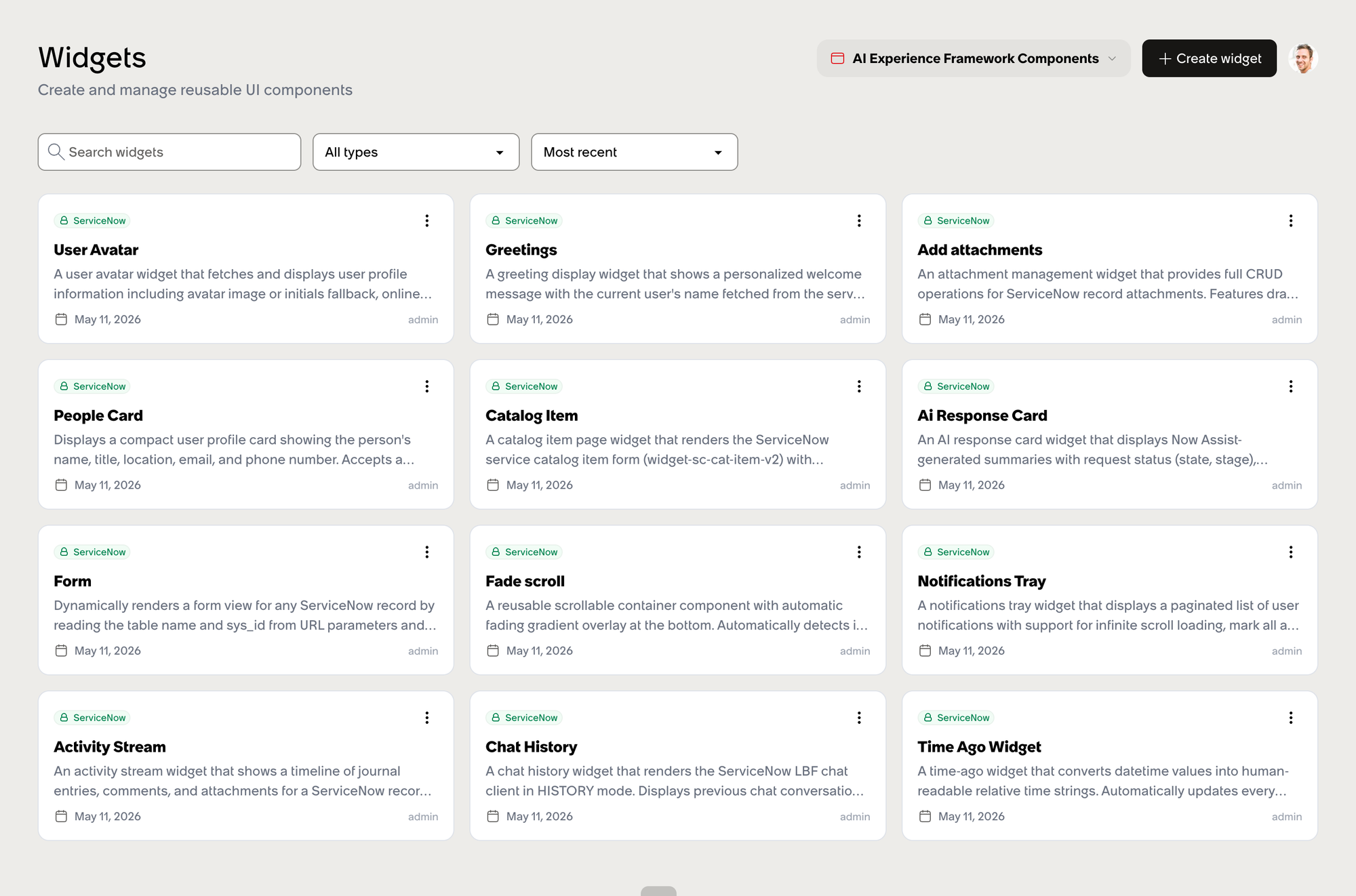
Slate is at its own suffix. Build your own experience with url_suffix=esc and it's at /aiux/esc/.... Cleanly path-based, deep-linkable, no query strings involved. There is no ?experience= escape hatch — I checked, the entry servlet (/$ai_experience.do) returns byte-identical HTML for every query variation I threw at it. The experience comes from the URL pathname, full stop.
Employee Slate is at /aiux/employeeslate.
The schema in one paragraph
Twenty-nine sys_aix_* tables back the framework, all in the global scope.
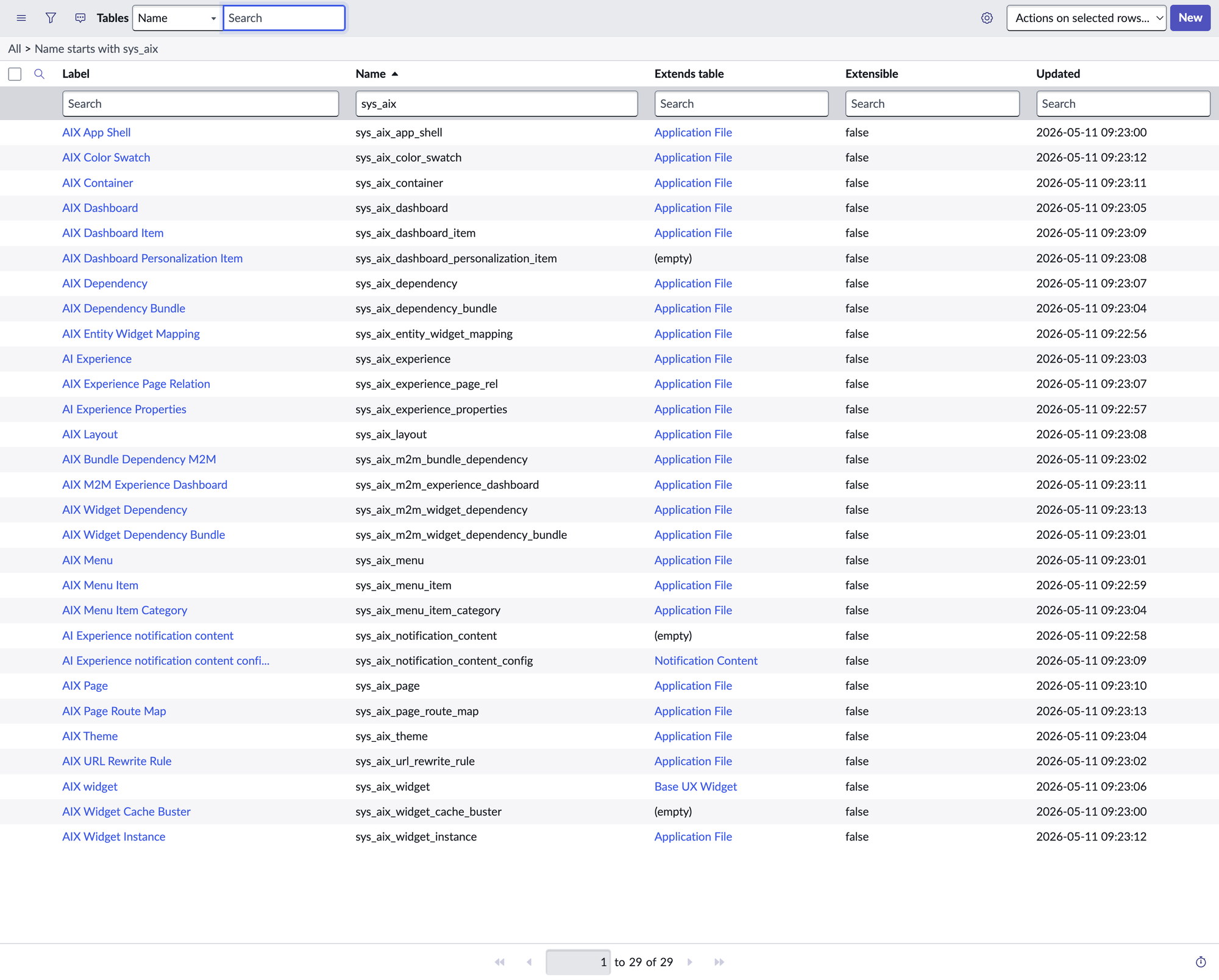
Tables
| Label | Name |
| AI Experience | sys_aix_experience |
| AI Experience notification content | sys_aix_notification_content |
| AI Experience notification content configuration | sys_aix_notification_content_config |
| AI Experience Properties | sys_aix_experience_properties |
| AIX App Shell | sys_aix_app_shell |
| AIX Bundle Dependency M2M | sys_aix_m2m_bundle_dependency |
| AIX Color Swatch | sys_aix_color_swatch |
| AIX Container | sys_aix_container |
| AIX Dashboard | sys_aix_dashboard |
| AIX Dashboard Item | sys_aix_dashboard_item |
| AIX Dashboard Personalization Item | sys_aix_dashboard_personalization_item |
| AIX Dependency | sys_aix_dependency |
| AIX Dependency Bundle | sys_aix_dependency_bundle |
| AIX Entity Widget Mapping | sys_aix_entity_widget_mapping |
| AIX Experience Page Relation | sys_aix_experience_page_rel |
| AIX Layout | sys_aix_layout |
| AIX M2M Experience Dashboard | sys_aix_m2m_experience_dashboard |
| AIX Menu | sys_aix_menu |
| AIX Menu Item | sys_aix_menu_item |
| AIX Menu Item Category | sys_aix_menu_item_category |
| AIX Page | sys_aix_page |
| AIX Page Route Map | sys_aix_page_route_map |
| AIX Theme | sys_aix_theme |
| AIX URL Rewrite Rule | sys_aix_url_rewrite_rule |
| AIX widget | sys_aix_widget |
| AIX Widget Cache Buster | sys_aix_widget_cache_buster |
| AIX Widget Dependency | sys_aix_m2m_widget_dependency |
| AIX Widget Dependency Bundle | sys_aix_m2m_widget_dependency_bundle |
| AIX Widget Instance | sys_aix_widget_instance |
Two inheritance signals are worth lingering on. sys_aix_widget extends sys_ux_widget — not sp_widget. That's structurally significant but not historically loaded: sys_ux_widget doesn't have meaningful tenancy outside sn_aiux today, so the inheritance is more about declaring family than joining an existing one. What's notable is what didn't come along for the ride: sn_aiux did not inherit UI Builder's metadata-in-tables philosophy. Your widget's component lives in a single component field as readable Lit source, not scattered across fifteen rows of sys_ux_* records you have to assemble in your head to understand what the thing does. Everyone who looked at UIB, tried to author a macroponent, and quietly closed the tab: this is your moment of vindication. The good idea from that lineage (modern web components) is here. The bad idea (the component as a relational graph) didn't make the trip.
The other inheritance worth noticing is sys_aix_notification_content_config extending sys_notification_content — joining the existing notification-content rows for Service Portal, Next Experience, Virtual Agent, and Workspace. sn_aiux is plugging into a shared platform-wide notification family rather than reimplementing one. Most other AIEX tables extend sys_metadata, so everything is update-set-capturable for promotion. Good news for migrations.
One concept sn_aiux did borrow from UI Builder that Service Portal never had: sys_aix_app_shell. It's a level above the experience — a chrome/header/navigation wrapper shared across multiple experiences. UIB has the same idea for its UX apps; Service Portal sort of expected you to handle it inside every portal's theme and header widgets. Having a dedicated record for it is the right call, especially if you're going to ship more than one experience under a single brand.
The Application Navigator menu reinforces all of this. Once the apps are installed, you get a fresh module called AI Experience Framework (AIUX) with sub-modules for Experiences, Pages, Containers, Widgets, Widget Instances, Widget Dependencies, Dashboards, Menus, and Themes.
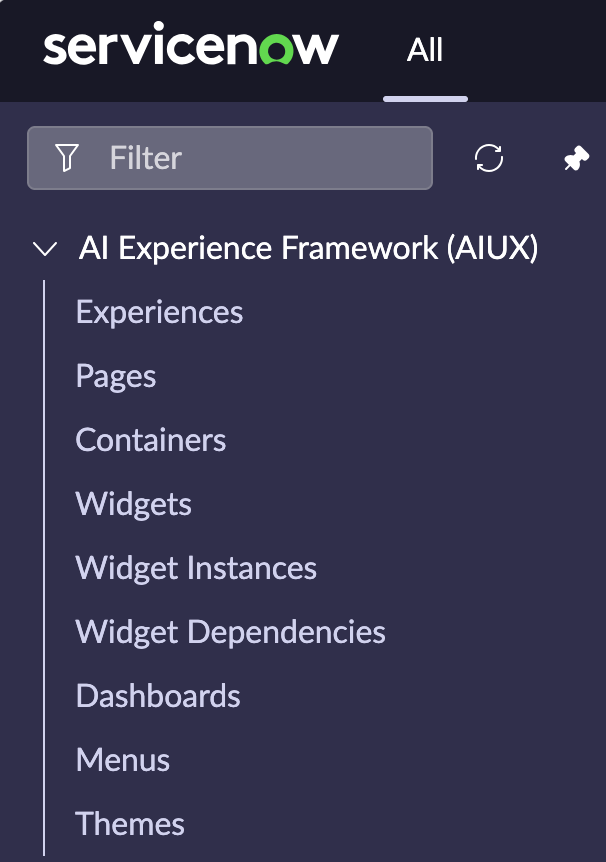
Read that list back to yourself slowly. Anyone who's spent more than ten minutes inside the Service Portal application navigator should be having a strong sense of déjà vu. The shape of the framework is, very deliberately, the shape of the framework people already know. ServiceNow has clearly internalized that the path to adoption runs through familiarity, and it built the navigation accordingly.
The widget, in detail
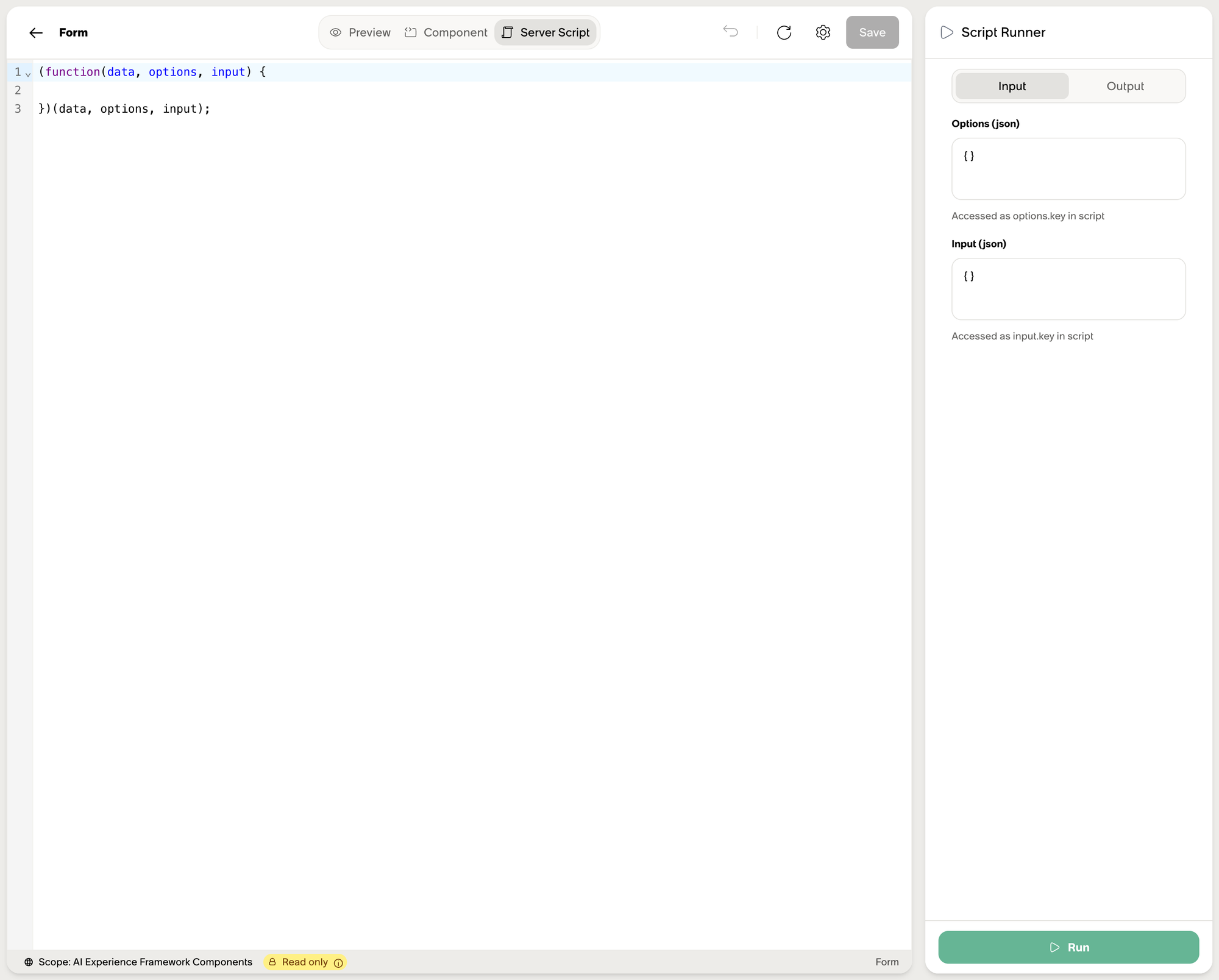
A sys_aix_widget record looks a lot like an sp_widget record if you squint, with a few additions. Same id slug. Same name, description, style. The server script field uses the identical IIFE signature — (function(data, options, input) { ... })(data, options, input) — and inside that script you have the same gs.*, GlideRecord, GlideSPScriptable APIs you've always had. The Activity Stream widget literally instantiates new GlideSPScriptable("7cf6e70a3f..."), the same aiuxsp portal sys_id we found earlier. This is where the sidecar earns its keep: an sn_aiux widget that wants a portal-scoped $sp reaches into the SP record next door. Not every widget needs it — pure-Lit widgets ignore the sidecar entirely — but the option is there for the ones that do.
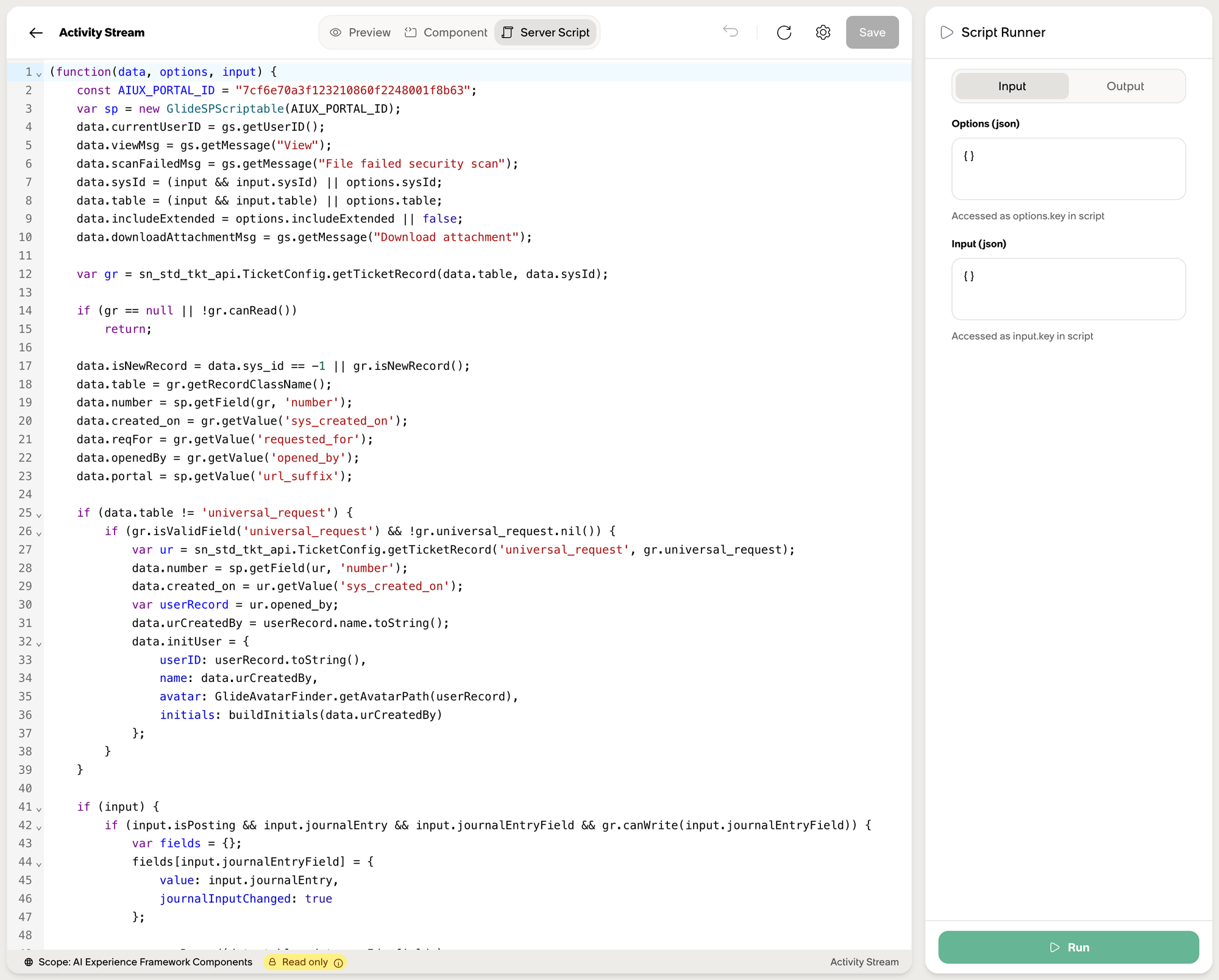
What's different is the component field. Instead of an Angular template plus a controller function, it holds a Lit.js web-component class:
import { html } from 'lit';
import { AIUXWidgetElement } from '@servicenow/aiux-components-core';

class MyWidget extends AIUXWidgetElement {
  static properties = { sysId: { type: String } };
  render() {
    return html`<div class="aiux-card">...</div>`;
  }
}
The styling system is Tailwind under DaisyUI, both bundled and prefixed under aiux-*. If you've ever written lit-html and reached for DaisyUI's card, btn, or modal semantic classes, you already know 90% of the surface area. The learning curve is real but short.
Two new fields show up that Service Portal never had. best_for is a natural-language description of when to use the widget — engineered for an AI agent to read and decide whether to invoke. client_tools is a JSON manifest of UI actions the widget exposes back to the agent. Activity Stream's client_tools declares a postComment tool whose description starts with [IMMEDIATE ACTION - UI CONTROL] and lists keyword triggers. It's a typed contract between the widget and the conversational layer.
The Service Portal bridge
The single most important architectural decision in sn_aiux is this: it doesn't replace sp_widget. It embeds it.
Three of the nineteen out-of-the-box widgets are pure adapters around existing Angular Service Portal widgets. The Form widget (form-widget) wraps widget-form. The Catalog Item widget wraps widget-sc-cat-item-v2. The Order Guide widget wraps widget-sc-order-guide-v2. The pattern is the same in all three: a few lines of Lit that read URL params, build an options object, and hand it off to a custom element called <aiux-angular-element>.
Here's the entire Form widget component
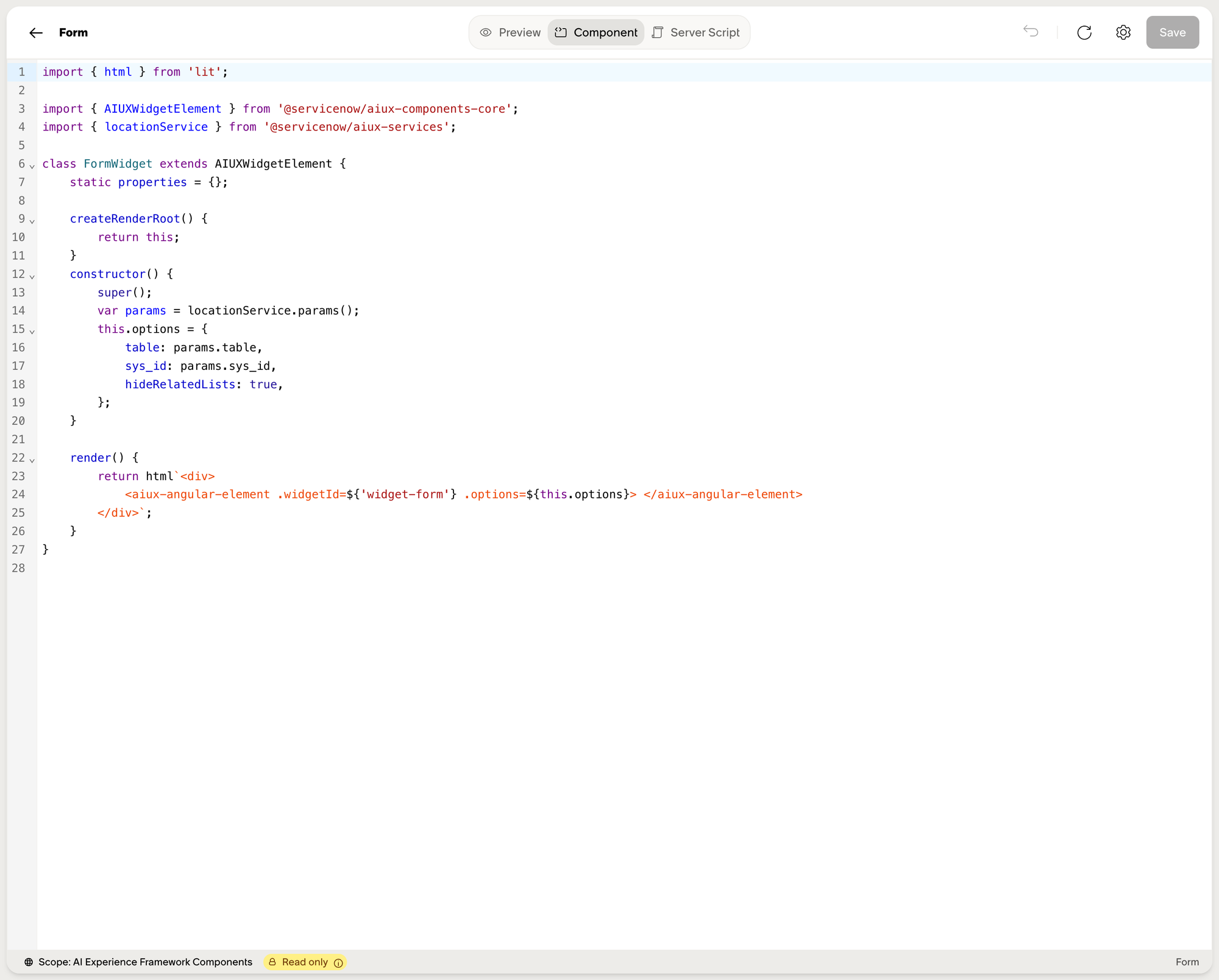
import { html } from 'lit';
import { AIUXWidgetElement } from '@servicenow/aiux-components-core';
import { locationService } from '@servicenow/aiux-services';

class FormWidget extends AIUXWidgetElement {
  createRenderRoot() { return this; }
  constructor() {
    super();
    const params = locationService.params();
    this.options = {
      table: params.table,
      sys_id: params.sys_id,
      hideRelatedLists: true,
    };
  }
  render() {
    return html`
      <aiux-angular-element
        .widgetId=${'widget-form'}
        .options=${this.options}>
      </aiux-angular-element>`;
  }
}
That's it. <aiux-angular-element> is the runtime adapter. At mount time it bootstraps the embedded AngularJS Service Portal engine inside the Lit DOM, looks up widget-form by its sp_widget.id, runs that widget's server script with the supplied options, and renders its Angular template inside the modern shell. The Form widget's own server script is empty — there's nothing for it to do.
This is the migration story. Your Service Portal investment isn't deprecated. For any widget that already works — and especially the complex ones with cart logic, variable trees, form-engine bindings — you wrap it in twenty lines of Lit and ship it inside an sn_aiux experience. New work happens in pure Lit. The two live in the same page.
Porting a real widget: the Cool Clock
The bridge pattern is easier to internalize when you actually use it on something real, so let's pick a widget every long-time Service Portal developer has seen: Cool Clock (widget-cool-clock). It ships out of the box on every instance — an analog clock face with a configurable timezone and a configurable color for the second hand. Its option_schema is exactly two fields:
[
  {
    "name": "zone",
    "default_value": "America/Los_Angeles",
    "section": "Data",
    "label": "TimeZone",
    "type": "string"
  },
  {
    "name": "c_color",
    "default_value": "red",
    "section": "Presentation",
    "label": "Second hand color",
    "type": "string"
  }
]
We are not going to rewrite Cool Clock. The whole point of the exercise is that we don't have to. The widget already exists, it already works in Service Portal, and <aiux-angular-element> will run it unchanged. All we're building is the sn_aiux adapter.
Open /aiux/builder/widgets and create a new sys_aix_widget:
- Custom element name (id):
cool-clock-aix - Widget name: Cool Clock
- Description: Bridges the OOB
widget-cool-clockService Portal widget into an sn_aiux experience.
Set the component field to:
import { html } from 'lit';
import { AIUXWidgetElement } from '@servicenow/aiux-components-core';

class CoolClockAix extends AIUXWidgetElement {
  static properties = {
    zone:    { type: String },
    c_color: { type: String },
  };

  createRenderRoot() { return this; }

  constructor() {
    super();
    this.zone = 'America/Los_Angeles';
    this.c_color = 'red';
  }

  render() {
    const options = {
      zone:    this.zone,
      c_color: this.c_color,
    };
    return html`
      <aiux-angular-element
        .widgetId=${'widget-cool-clock'}
        .options=${options}>
      </aiux-angular-element>`;
  }
}
Set the input_schema to mirror the SP widget's options so the Builder UI can configure them:
{
  "zone":    { "type": "String", "description": "TimeZone (e.g. America/Los_Angeles)" },
  "c_color": { "type": "String", "description": "Second hand color" }
}
Leave the server script field as the empty IIFE. The original widget-cool-clock already has its own server script and the bridge will run it.
Drop cool-clock-aix onto a sys_aix_page, set zone and c_color from the inline configuration, and reload. The Lit wrapper mounts. <aiux-angular-element> boots the embedded Angular runtime. The runtime looks up widget-cool-clock by its sp_widget.id, runs its server script with options = { zone, c_color }, and renders the existing template inside your sn_aiux page. The clock ticks. The second hand is the color you asked for. The timezone is the one you asked for. Nothing about the widget itself changed.
That's the whole pattern. A widget that has shipped on every Service Portal instance for the better part of a decade now runs inside sn_aiux with zero modifications and roughly twenty-five lines of Lit. Multiply that by every widget in your existing portal and you can start to see why the bridge is a bigger deal than the rest of the framework combined.
The migration tax, in theory
The config payload from /api/now/aix/config/builder includes an array I almost skipped past on first read. It looks like this:
{ "source_type": "portal_page", "portal_page": "kb_article",
  "parameter_mapping": { "sys_id": "sys_id" },
  "to_aiux_page": "/knowledge/:sys_id" },

{ "source_type": "processor", "processor": "kb_view.do",
  "parameter_mapping": { "sys_kb_id": "article_id" },
  "to_aiux_page": "/knowledge/:article_id" },

{ "source_type": "processor", "processor": "sc_cat_item.do",
  "parameter_mapping": { "sys_id": "item_id" },
  "to_aiux_page": "/catalog/:item_id" }
These records live in sys_aix_url_rewrite_rule. Two source_type values appear in the OOB data: portal_page (a hit on a Service Portal sp_page) and processor (a hit on a legacy .do processor URL). The intent is clear: intercept incoming legacy URLs and translate them into the equivalent sn_aiux paths so existing deep links — kb_view.do?sys_kb_id=XYZ, sc_cat_item.do?sys_id=ABC, a custom processor someone wrote years ago — keep resolving after you switch an experience over.
That's the intent. I want to be honest that I haven't fully confirmed it's working end-to-end yet. The table is present, the rule shape is sensible, the config endpoint returns the rules — but the actual rewriter component that consumes them is somewhere I haven't traced, and I haven't tested a clean cutover with a legacy URL coming in from email. File this one under "promising mechanism, verify before you bet a rollout on it." Worth keeping a close eye on the table, the relevant sys_aix_url_rewrite_rule records, and the rewrite behavior under the network panel before you tell stakeholders the old links will just work.
The 404 page is a Breakout game (again)
Anyone who spent enough time poking at the default /sp portal back in the day knows that the Service Portal 404 page also rendered a Breakout game. It was a tiny piece of personality buried in sp_page and the matching widget, and most customers stripped it out before going to production. sn_aiux brings it back, and this is the homage I didn't know I needed.
Navigate to /aiux/builder (no page path) and the experience tries to land on /home. There is no page in sys_aix_page with path_pattern: /home for the Builder experience, so the router falls through to the 404 page (/not-found). The 404 page embeds a widget called breakout-game, which is a fully implemented, fully playable clone of Atari Breakout — scoreboard, lives counter, paddle, the works (02-builder-home-404-breakout.png, page-12-breakout-editor-preview.png).
It's also a real widget in sys_aix_widget, with a real description that gives the new joke away: "Demonstrating client tools functionality and interactive widget capabilities. A fun example widget that showcases how AI agents can interact with widgets through client tools." The Breakout widget exposes four client_tools — reset-game, pause-game, get-game-state, set-difficulty — so on top of being a nostalgic callback, the 404 page is now doing double duty as the framework's onboarding demo for the agent-widget interaction model.
I respect the continuity. A small thing, but it tells you where the framework's center of gravity is: every page is a widget composition, including the system's own error states, and every widget that can be configured can also be driven by an AI. And ten years later, someone at ServiceNow still thinks the right easter egg is Breakout.
What I took away
After two and a half hours and some altitude, the picture that settled out is this. sn_aiux is ServiceNow's third swing at the portal problem in ten years — though, again, the official scoreboard reads "second." What's striking is how deliberately it leans back into the parts of Service Portal that worked and that customers built a mountain of stuff on. The server-script model is unchanged. gs.*, GlideRecord, GlideSPScriptable all behave the way they always have. The widget unit-of-authoring — a record with a server script, a template, a stylesheet, an option schema — is the same shape, just modernized underneath. Angular-1 templates become Lit web components. Bootstrap CSS becomes Tailwind/DaisyUI. The application-navigator menu is, structurally, the Service Portal menu re-photographed. None of that is accidental.
It's also a very ServiceNow move in the bigger sense. The platform has a long-running habit of bringing the old thing along while embracing the new one — Update Sets that survived a dozen rewrites, scoped applications grafted onto a global-scope foundation, Flow Designer running alongside Workflow Editor for years. sn_aiux fits the pattern. Your existing sp_widget library isn't deprecated; it's wrapped. Your sys_metadata extensions promote the same way they always did. The bridge layer (<aiux-angular-element>) is a first-class runtime feature, not a forgotten compatibility shim, and that single decision is what makes adoption a non-decision rather than a project.
If sn_aiux had told everyone rebuild your widgets, adoption would have stalled the way Now Experience adoption did. Instead, ServiceNow let you keep every Angular widget you've ever written and surface it in the new world with twenty lines of glue. The framework is compelling enough on its own merits — the AI surface, the URL routing, the Builder UX — but the bridge is what makes "should we" stop being the interesting question.
The thing I'd do first, if I were starting a real project on this: pick one Service Portal page that gets a lot of traffic, stand up a new sys_aix_experience, wrap the existing widgets with the Cool Clock pattern, populate sys_aix_url_rewrite_rule so the old URLs should continue to work (and verify they actually do), and ship. Iterate from there.
One closing ask of ServiceNow, while I'm here. Lit, Tailwind, and DaisyUI are genuinely good choices. Lit ships releases a couple of times a year. Tailwind ships breaking changes. DaisyUI is already on v5. Please keep this stack current. Service Portal sat on AngularJS for ten years past the point Google started telling people to migrate. If the next time someone has to write a post like this is Knowledge 2036 because the framework underneath has fossilized again, the migration calculus is going to look very different. Pick a refresh cadence that's shorter than the lifespan of a Toyota Corolla.
Ten years on, I still think the framework rewards curiosity. The plane ride home from Knowledge has become a tradition. I'd like to keep it.
References
- The runtime bundle:
/sncapps/aix/assets/index-D24AXy2E.js(~2.4 MB — contains the URL pattern, route context, experience loader, and DaisyUI styles) - The experience config endpoint:
GET /api/now/aix/config/<url_suffix>(Accept:multipart/mixed) - The 29-table list:
sys_db_object_list.do?sysparm_query=nameSTARTSWITHsys_aix - Five tables to read first:
sys_aix_experience,sys_aix_page,sys_aix_widget,sys_aix_widget_instance,sys_aix_url_rewrite_rule - The OOB widget to read first: Form (
form-widget) — the canonical SP-bridge pattern in twenty lines